Artificial Intelligence (AI) is transforming how students learn, research, and complete assignments. From writing essays to solving math problems, AI tools can help students save time, improve productivity, and learn more effectively.
In 2026, many powerful AI tools are available that can assist students with studying, writing, research, note-taking, and even exam preparation.
In this guide, we will explore the best AI tools for students, including both free and paid options. These tools can help high school, college, and university students improve their academic performance.

Why Students Should Use AI Tools
AI tools are becoming essential for modern learning. They provide intelligent assistance that helps students complete tasks faster and more efficiently.
Here are some benefits of using AI tools for studying:
• Save time on research
• Improve writing and grammar
• Generate study notes quickly
• Solve complex problems
• Organize assignments and projects
• Improve productivity and focus
AI does not replace learning, but it can make studying easier and more effective.
10 Best AI Tools for Students in 2026 (Free & Paid)
Students can also use AI writing tools to improve essays and assignments. Check our guide on Best AI Writing Tools for Content Creators.
1. ChatGPT – Best AI Study Assistant
ChatGPT is one of the most popular AI tools used by students worldwide. It helps students with writing, brainstorming ideas, answering questions, and explaining difficult concepts.
Students can ask ChatGPT to summarize chapters, explain scientific concepts, or generate essay outlines.
Key Features
Answer academic questions instantly
Generate essay ideas
Summarize long articles
Explain complex topics in simple language
Help with coding and technical subjects
Best For
Essay writing, research help, and understanding complex topics.
Pricing
Free plan available. Premium plan offers more advanced features.
2. Grammarly – Best AI Writing Assistant
Grammarly is an AI-powered writing tool that helps students improve grammar, spelling, clarity, and tone.
Many students use Grammarly to edit essays, assignments, and research papers before submission.
Key Features
Grammar and spelling correction
Writing clarity suggestions
Tone detection
Plagiarism checker
AI writing assistance
Best For
Essay writing, academic papers, and assignments.
Pricing
Free version available. Premium plan includes advanced writing suggestions.
3. Notion AI – Best AI Tool for Note Taking
Notion AI is an excellent productivity tool that helps students organize notes, assignments, and projects.
Students can create study plans, summarize notes, and manage tasks using this powerful AI workspace.

Key Features
AI note summarization
Task management
Study planning
Research organization
AI writing assistant
Best For
Note-taking, productivity, and project management.
Pricing
Free plan available with paid upgrades.
4. Wolfram Alpha – Best AI Tool for Math and Science
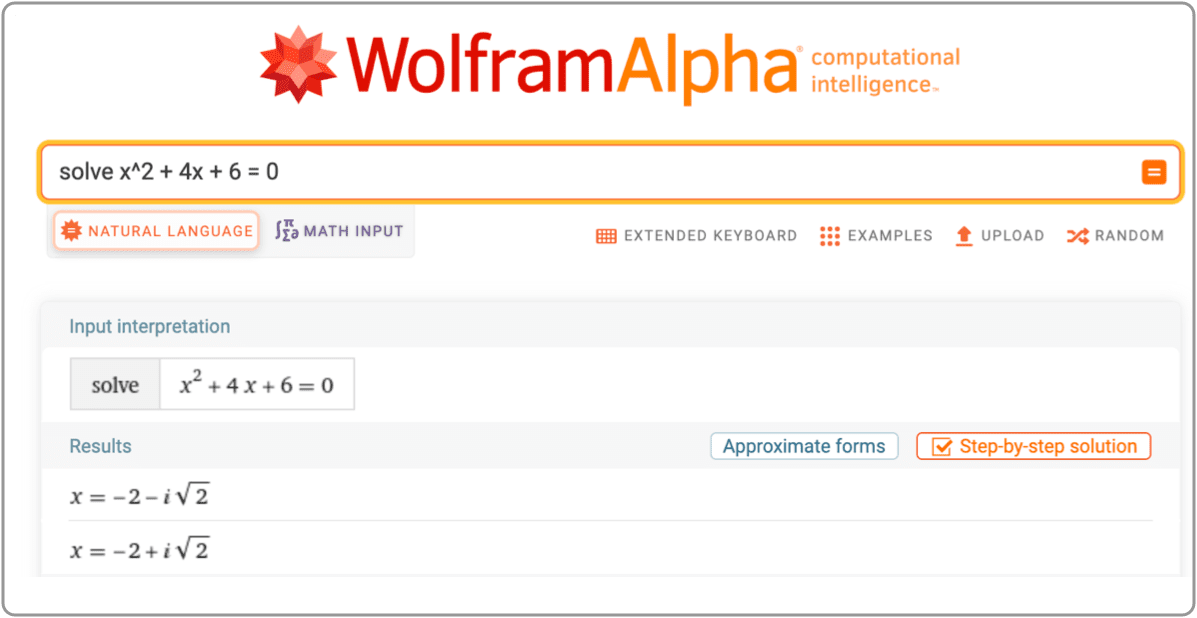
Wolfram Alpha is one of the best AI tools for solving mathematical and scientific problems.
Students can enter equations and get step-by-step solutions, making it extremely useful for subjects like algebra, calculus, physics, and chemistry.
Key Features
Solve complex math problems
Step-by-step explanations
Scientific calculations
Data analysis
Best For
Math, engineering, physics, and science students.
Pricing
Free version available with premium features.
5. QuillBot – Best AI Paraphrasing Tool
QuillBot is a popular AI writing tool that helps students paraphrase sentences and improve writing quality.
It is especially useful for rewriting research content in your own words while maintaining clarity.
Key Features
AI paraphrasing tool
Grammar checker
Summarizer
Citation generator
Best For
Essay rewriting and paraphrasing academic content.
Pricing
Free plan available. Premium offers more rewriting modes.
6. Otter.ai – Best AI Tool for Lecture Notes
Otter.ai is an AI transcription tool that records lectures and converts speech into text.
Students can use it during lectures or online classes to capture important information automatically.

Key Features
Real-time transcription
Lecture recording
AI meeting summaries
Searchable transcripts
Best For
Recording lectures and creating study notes.
Pricing
Free plan available with limited transcription minutes.
7. Canva AI – Best AI Tool for Presentations
Canva is a popular design platform that now includes powerful AI features for creating presentations, graphics, and visual projects.
Students can use Canva AI to design slides, infographics, and academic presentations easily.
Key Features
AI presentation generator
Graphic design tools
Templates for projects
AI image generator
Best For
Creating presentations and visual projects.
Pricing
Free plan available.
8. Perplexity AI – Best AI Research Tool
Perplexity AI is a powerful AI research assistant that helps students find accurate information quickly.
Unlike traditional search engines, it provides direct answers with source references.
Key Features
AI-powered search engine
Source-based answers
Quick research summaries
Academic topic exploration
Best For
Research and academic study.
Pricing
Free version available.
9. Tome AI – Best AI Presentation Generator
Tome AI helps students create professional presentations quickly.
You simply enter a topic, and the AI generates slides, content, and visuals automatically.

Key Features
AI-generated presentations
Storytelling slides
Visual content generation
Easy editing
Best For
School and university presentations.
10. Google Gemini – AI Learning Assistant
Google Gemini is another powerful AI assistant that helps students research topics, write content, and solve academic problems.
It integrates with Google services like Docs and Gmail, making it useful for students.

Key Features
AI-powered research help
Writing assistance
Integration with Google tools
Fast information retrieval
Best For
Research, writing, and productivity.
How to Use AI Tools Responsibly as a Student
While AI tools are powerful, students should use them responsibly.
AI should assist learning rather than replace it.
Here are some best practices:
• Use AI to understand concepts, not just copy answers
• Always verify information from reliable sources
• Avoid plagiarism in assignments
• Use AI tools for brainstorming and editing
Responsible use of AI will help students develop better learning habits.
Are AI Tools Safe for Students?
Most AI tools are safe to use if students choose trusted platforms.
However, students should be careful about:
• Sharing personal data
• Submitting AI-generated content without editing
• Using AI for cheating in exams
AI should support education, not replace genuine learning.
Future of AI in Education
AI is expected to play a major role in education over the next decade.
Future AI tools may include:
• Personalized learning assistants
• AI tutors for every subject
• Automated study plans
• Real-time learning feedback
These technologies will make education more accessible and efficient for students worldwide.
Frequently Asked Questions (FAQ)
1. What are the best AI tools for students in 2026?
Some of the best AI tools for students in 2026 include ChatGPT, Grammarly, Notion AI, QuillBot, Wolfram Alpha, Canva AI, and Otter.ai. These tools help students with writing, research, note-taking, and productivity.
2. Are AI tools free for students?
Yes, many AI tools offer free versions for students. Tools like ChatGPT, Grammarly, QuillBot, Canva, and Notion AI provide free plans with basic features. However, premium versions may include advanced tools.
3. Can students use AI tools for homework?
Yes, students can use AI tools for homework to understand concepts, generate ideas, and improve writing. However, students should avoid copying AI-generated content directly and always review their work.
4. Which AI tool is best for writing assignments?
Grammarly and ChatGPT are among the best AI tools for writing assignments. Grammarly improves grammar and clarity, while ChatGPT helps generate ideas and explain topics.
5. What AI tool is best for solving math problems?
Wolfram Alpha is one of the best AI tools for solving math problems. It provides step-by-step solutions for algebra, calculus, physics, and engineering problems.
6. Are AI tools safe for students?
Most AI tools are safe when used responsibly. Students should avoid sharing personal information and always verify important academic information from trusted sources.
7. How can AI tools improve student productivity?
AI tools help students by saving time on research, organizing notes, generating summaries, and improving writing quality. This allows students to focus more on learning and understanding topics.
Copilot+ in Windows 11: The AI-Powered Revolution for PCs
Final Thoughts
AI tools are revolutionizing the way students study and complete academic work. From writing essays to solving math problems, AI can help students become more productive and organized.
Some of the best AI tools for students include ChatGPT, Grammarly, Notion AI, QuillBot, Wolfram Alpha, Otter.ai, and Canva AI.
By using these tools responsibly, students can improve their learning experience and achieve better academic results.
As AI technology continues to evolve, students who learn to use these tools effectively will have a strong advantage in education and future careers.