Avast Free Antivirus for Windows – Free Download (Latest Version 2026)
In today’s digital world, protecting your computer from viruses, malware, spyware, and ransomware is more important than ever. Every time you connect to the internet, download files, open emails, or browse websites, your computer may face potential security threats.
Cybercriminals constantly create new types of malware designed to steal personal information, damage files, or gain unauthorized access to your system. This is why installing a reliable antivirus program is essential for every computer user.
One of the most popular and trusted security solutions available today is Avast Free Antivirus for Windows. Avast has built a strong reputation in the cybersecurity industry by providing powerful protection against viruses and online threats while keeping the software lightweight and easy to use.
In this guide, we will explore everything you need to know about Avast Free Antivirus, including its features, benefits, system requirements, installation steps, and why it is considered one of the best free antivirus programs available today.

What is Avast Free Antivirus?
Avast Free Antivirus is a powerful security program developed by Avast Software, a globally recognized cybersecurity company. The software provides advanced protection against viruses, malware, spyware, ransomware, and phishing attacks.
The antivirus uses modern detection technologies, including behavior analysis and cloud-based threat detection, to identify both known and unknown threats.
Millions of users worldwide rely on Avast Free Antivirus to protect their computers, laptops, and online activities. The free version includes essential protection features that keep your device secure without requiring any subscription.
Avast combines strong security technology with a user-friendly interface, making it suitable for both beginners and advanced users.
Avast Free Antivirus Software Information
Software Name: Avast Free Antivirus
Developer: Avast Software
Category: Antivirus & Security
License: Free
File Size: Approximately 230 MB
Operating System: Windows 7 / Windows 8 / Windows 10 / Windows 11
Language Support: Multiple Languages
Latest Version: 2026
Official Website: avast.com
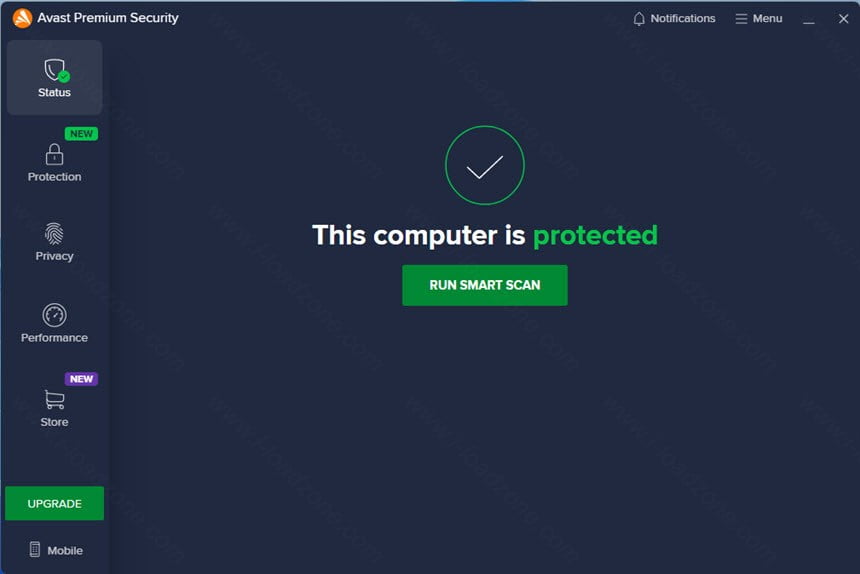
Download Avast Free Antivirus for Windows
You can download the latest version of Avast Free Antivirus for Windows from the official Avast website or trusted software download platforms.
Once downloaded, the installer allows you to quickly install the antivirus and begin protecting your system within minutes.
After installation, Avast automatically updates its virus definitions and begins monitoring your computer for potential threats.
Key Features of Avast Free Antivirus
Avast Free Antivirus offers a variety of powerful security features designed to protect your computer from different types of threats.
Real-Time Protection
Real-time protection continuously scans your system for suspicious activity. If any malicious file or program is detected, Avast immediately blocks it before it can harm your computer.
Smart Scan
The Smart Scan feature quickly analyzes your computer for viruses, outdated software, weak passwords, browser threats, and network vulnerabilities.
Web Shield
The Web Shield protects users while browsing the internet by blocking dangerous websites, malicious downloads, and phishing attacks.
Email Shield
Email Shield scans incoming and outgoing email messages for infected attachments or malicious links.
Behavior Shield
Behavior Shield monitors programs running on your computer and detects suspicious activities that may indicate malware.
Ransomware Protection
Avast protects important files from ransomware attacks by monitoring programs that attempt to modify sensitive files.
Automatic Virus Updates
The antivirus regularly updates its virus database to ensure protection against the latest threats.
Why Avast Free Antivirus is Popular
There are many antivirus programs available today, but Avast Free Antivirus remains one of the most popular choices among Windows users.
Here are some reasons why millions of people trust Avast.
✔ Completely free for personal use
✔ Real-time virus protection
✔ Easy-to-use interface
✔ Frequent security updates
✔ Lightweight system performance
✔ Protection from phishing and malware
These advantages make Avast one of the best free antivirus solutions available.
System Requirements
Before installing Avast Free Antivirus, make sure your computer meets the following system requirements.
Operating System: Windows 7, Windows 8, Windows 10, or Windows 11
Processor: Intel Pentium 4 or higher
RAM: Minimum 1 GB
Storage: At least 2 GB free disk space
Internet Connection: Required for updates
Most modern computers can easily run Avast without slowing down system performance.
How to Install Avast Free Antivirus
Installing Avast Free Antivirus is simple and takes only a few minutes.

Step 1
Download the Avast installer file from the official website.
Step 2
Open the downloaded setup file.
Step 3
Click the Install button.
Step 4
Wait while the software installs on your computer.
Step 5
Restart your computer if required.
Once installation is complete, Avast will begin scanning your system for threats.
How Avast Protects Your Computer
Avast uses multiple security technologies to protect your computer.
Signature-Based Detection
The antivirus detects known viruses using a large database of virus signatures.
Behavior Monitoring
Avast monitors program behavior to identify unknown threats.
Cloud Intelligence
Threat data is analyzed using cloud technology to detect emerging malware.
Network Security
Avast scans your home network for vulnerabilities and unauthorized access.
Benefits of Using Avast Free Antivirus
Using Avast Free Antivirus provides several important benefits.
Improved computer security
Protection against online threats
Safer internet browsing
Protection from malicious downloads
Enhanced privacy protection
These benefits help ensure that your computer remains safe while using the internet.

Avast Free Antivirus vs Other Antivirus Programs
Many users compare Avast with other antivirus software such as AVG, Avira, and Windows Defender.
Avast offers more advanced features than most free antivirus programs, including real-time protection, ransomware protection, and web security tools.
While Windows Defender provides basic protection, Avast includes additional security layers that improve overall system safety.
Pros and Cons of Avast Free Antivirus
Pros
Free antivirus protection
Strong malware detection
Easy installation process
Regular updates
Lightweight performance
Cons
Shows occasional upgrade advertisements
Some advanced features require paid version
Despite these limitations, Avast remains one of the most reliable free antivirus programs.
Tips to Improve Computer Security
To maximize your security while using Avast Free Antivirus, follow these best practices.
Keep your antivirus updated
Avoid downloading files from unknown websites
Regularly scan your computer
Use strong passwords
Install Windows security updates
These steps will significantly reduce the risk of malware infections.
Frequently Asked Questions
Is Avast Free Antivirus safe?
Yes, Avast Free Antivirus is developed by a trusted cybersecurity company and is used by millions of people worldwide.
Does Avast slow down the computer?
Avast is designed to be lightweight and usually does not significantly affect system performance.
Is Avast compatible with Windows 11?
Yes, Avast Free Antivirus fully supports Windows 11.
Can Avast remove malware?
Yes, Avast can detect and remove viruses, spyware, ransomware, trojans, and other malicious software.
How often should I scan my computer?
It is recommended to run a full system scan at least once per week.
Final Thoughts
Avast Free Antivirus for Windows is one of the best free security solutions available today. With powerful features such as real-time protection, malware detection, ransomware protection, and secure browsing tools, Avast provides reliable protection for everyday computer users.
If you are looking for a free, trusted, and easy-to-use antivirus program, Avast Free Antivirus is an excellent choice.
Installing a reliable antivirus program like Avast helps protect your personal data, improves system security, and ensures a safer online experience.
Related Posts:
You can also check these helpful guides:
- Best Free Antivirus for Windows 10 (2025 Edition) — Stay Safe Without Spending a Dime
- How to Turn Off Windows Defender Antivirus in Windows 10/11